Nothing to be scared of here. Unplug the light, wait for it to cool down, and let's go!
This example is with the Omni Kit lights, but the principle is the same for all lights.



This example is with the Omni Kit lights, but the principle is the same for all lights.
***UNPLUG the light!!***

1. Alright, you've got your UNPLUGGED, cooled-down light on a nice work surface.
Notice the spare bulb on the left. There should be one in your light case.

2. Unclip the barn doors and wire screen.

3. Remove the bad bulb. It's ok to touch this one.

4. Yep. Super broken.

5. Unpack the new bulb.
***DO NOT TOUCH THE BULB WITH YOUR BARE HANDS.***
The oil from your skin can make the bulb burst when it's turned on.

6. These bulbs come wrapped in a plastic sleeve. Just handle it with that.

7. Some bulbs have a polarity (just like a household wall socket).
Be sure to match up the holes.

8. Here we are, holes matched up, and not touching the bulb with my fingers.
Be sure to seat the bulb all the way into the socket. It can be a little tough.

9. Looking good.

10. Clip the wire screen and barn doors back on.
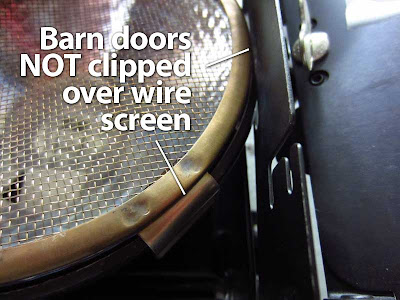
Be sure to offset the clips of the wire screen and the barn doors.
If you clip the barn doors onto the wire screen clips, they'll be dang hard to get off.

11. See? Offset. Like a boss.

12. Use left overs to decorate your hipster fixy, or Werner shrine.
